
You take on a new client. Somebody set the tenant up three years ago, it has worked fine since, and nobody has looked at it. You get Global Administrator, open the portal, and start reading.
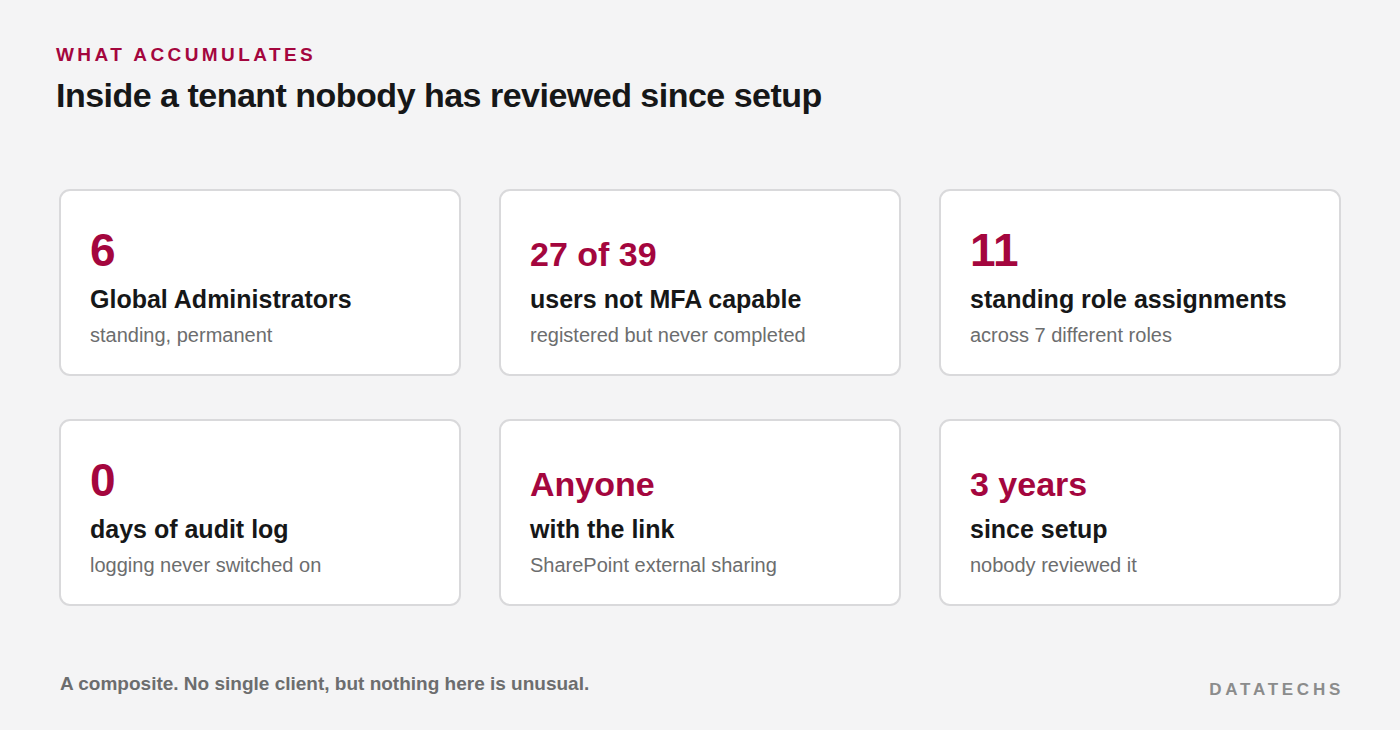
What follows is a composite. It is the pattern across the tenants I have inherited rather than any single client, because the striking thing is how little the details vary. Different industries, different sizes, different previous providers, same findings in roughly the same proportions.
How it gets like this
The person doing the setup needs Global Administrator. Reasonable. The owner wants to do things without waiting for the provider, so they get it too. The office manager keeps getting stuck on password resets, so they get it. Someone leaves and their replacement is added without the original being removed.
Three years later there are six accounts with complete control, and not one of them was granted unreasonably.
The same logic explains everything else. External sharing was left open because a project needed it. Audit logging was never switched on because nobody knew it was off. Legacy authentication stayed enabled because a scanner needed SMTP.
The first hour: get the real picture
Before touching anything, generate the inventory. This is also the document that justifies the remediation quote.
Connect-MgGraph -Scopes "Directory.Read.All","AuditLog.Read.All","Policy.Read.All"

# Every standing directory role assignment, not just Global Admin
Get-MgDirectoryRole -All | ForEach-Object {
    $role = $_
    Get-MgDirectoryRoleMember -DirectoryRoleId $role.Id -All | ForEach-Object {
        $u = Get-MgUser -UserId $_.Id -Property UserPrincipalName,AccountEnabled,SignInActivity -EA 0
        if ($u) {
            [pscustomobject]@{
                Role        = $role.DisplayName
                User        = $u.UserPrincipalName
                Enabled     = $u.AccountEnabled
                LastSignIn  = $u.SignInActivity.LastSignInDateTime
            }
        }
    }
} | Sort-Object Role, User | Export-Csv .\roles.csv -NoTypeInformation
The LastSignIn column is the one that makes the conversation easy. An account holding Global Administrator that has not signed in for eight months is not a debate.
Then MFA capability, which is almost never what the client believes:
Get-MgReportAuthenticationMethodUserRegistrationDetail -All |
  Select-Object UserPrincipalName, IsMfaCapable, IsAdmin, MethodsRegistered |
  Sort-Object IsMfaCapable, IsAdmin |
  Export-Csv .\mfa.csv -NoTypeInformation
And whether you have any history at all to work with:
Connect-ExchangeOnline
Get-AdminAuditLogConfig | Select-Object UnifiedAuditLogIngestionEnabled
That last one returning False changes the shape of the whole engagement, which is the next section.
Audit logging is the one that actually matters
Everything else on the list is a risk. This one is a constraint on what you can ever find out.
With logging on, an incident is a bad week: you can establish when they got in, what was opened, what rules were created, which clients were in the affected messages. You can tell people precisely what happened.
With logging off, none of that exists. Not because the answer is bad, but because the record was never written. Under UK GDPR the client still has to notify, and "we cannot determine what was accessed" is an expensive sentence to send to a customer list.
It is also the cheapest thing on the list to fix, which makes it the easiest first win:
Set-AdminAuditLogConfig -UnifiedAuditLogIngestionEnabled $trueOr in the portalpurview.microsoft.com › Solutions › Audit › Start recording user and admin activity
Switch it on in the first hour, before anything else, because it starts the clock on having a record and it costs nothing.
The order to unpick it
Sequence matters more than speed. This order avoids locking anyone out and avoids breaking things the client depends on.
- Audit logging on. Immediately. No approval needed, no user impact.
- Break glass accounts and the exclusion group. Before any Conditional Access exists.
- Baseline the legacy auth dependencies. Query first, block later. There will be a scanner.
- Dedicated admin accounts. One per person who genuinely needs privilege, no mailbox, no licence.
- Conditional Access in report-only. Full set, watch for a week or two.
- Move roles to eligible. PIM where the licence allows, otherwise at least off day-to-day accounts.
- Remove standing Global Administrator from the day-to-day accounts. Only once steps four and six are proven working.
- External sharing and the rest. Lower risk, do them when the identity work is stable.
Where to fix step eightadmin.microsoft.com › Show all › SharePoint › Policies › Sharing
Step seven is the one clients get nervous about, and the reason it is seventh rather than second. By that point everyone who needs privilege has a working route to it, so removing the old one is administrative rather than frightening.
What to tell the client
Resist the urge to present the full findings list at once. Sixteen red items reads as an accusation of the previous provider and puts people on the defensive, which is not useful even when it is fair.
What works better: this is what an unreviewed tenant looks like after three years, it is normal, here are the three things that would matter most if something went wrong, and here is what it takes to close them.
Then do the free ones in the first week. Audit logging on, dormant accounts disabled, sharing tightened. Visible progress before the first invoice buys a lot of patience for the parts that take longer.
The thing worth remembering
Tenants do not drift towards secure. Left alone they drift the other way, one reasonable exception at a time, and nothing in the day-to-day running of a business ever prompts anyone to look.
Which is the argument for a scheduled review rather than a one-off remediation, and it is a considerably easier conversation to have while you are holding the findings report.