
Every MSP I know has a Conditional Access baseline. Most of them exist as a document somebody wrote once, a set of screenshots, and a memory of roughly what was done on the last tenant.
That works until you have twenty tenants and no way to answer the question "is this client on the current baseline". Here is the set I deploy, the order that matters, and how to get it repeatable.
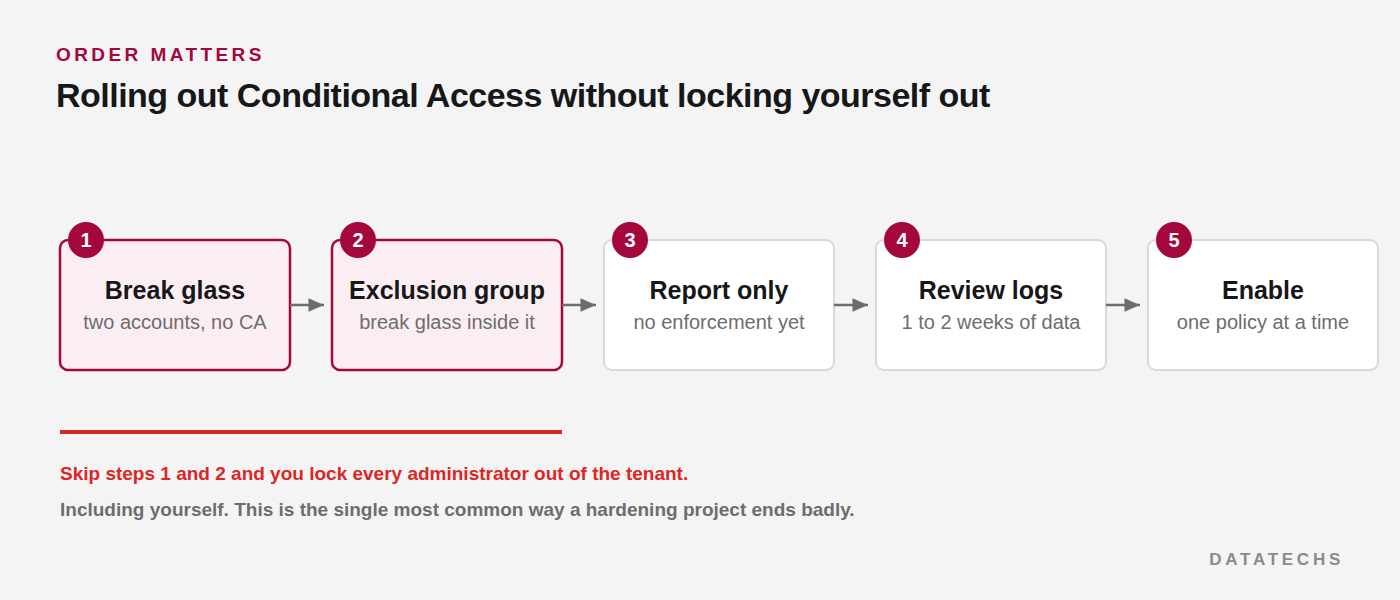
Build the escape hatch first
Before a single policy exists, two break glass accounts and an exclusion group. Not after. Not as step three.
Conditional Access is the most reliable way to lock yourself and every administrator out of a tenant, and the recovery path when it happens is a support ticket and a wait.
Connect-MgGraph -Scopes "User.ReadWrite.All","Group.ReadWrite.All","Policy.ReadWrite.ConditionalAccess"

# Exclusion group first
$grp = New-MgGroup -DisplayName "CA-Exclusions-BreakGlass" `
  -MailEnabled:$false -SecurityEnabled:$true `
  -MailNickname "ca-exclusions-breakglass"

# Two accounts, cloud only, no licence
1..2 | ForEach-Object {
  $upn = "bg-admin-0$_@$((Get-MgOrganization).VerifiedDomains |
          Where-Object IsDefault | Select-Object -Expand Name)"
  $pw  = -join ((33..126) | Get-Random -Count 32 | ForEach-Object {[char]$_})
  $u = New-MgUser -UserPrincipalName $upn -DisplayName "Break Glass 0$_" `
        -MailNickname "bg-admin-0$_" -AccountEnabled `
        -PasswordProfile @{ Password = $pw; ForceChangePasswordNextSignIn = $false }
  New-MgGroupMember -GroupId $grp.Id -DirectoryObjectId $u.Id
  "$upn  $pw"    # capture these, then put them in the vault
}
Those passwords go into a password vault with emergency-only access, not a spreadsheet and not a chat message. Set them never to expire. Then exclude that group from every policy you create from here on.
The baseline
Sixteen policies, of which eleven work on Business Premium and five need Entra ID P2. Deploy the eleven everywhere and treat the P2 five as an upsell conversation rather than a gap.
Runs on P1 and Business Premium
- Block legacy authentication. The single highest value policy in the set. Nothing else matters much while this is off.
- Require MFA for administrators. All privileged roles, no exceptions beyond break glass.
- Require MFA for all users. Once legacy auth is blocked, this actually means something.
- Block access from unsupported countries. A named location set that matches where the client operates.
- Require MFA for device registration. Closes a common gap in joining rogue devices.
- Block or restrict device code flow. An increasingly popular phishing route and rarely needed.
- Require approved app on mobile. Pairs with app protection policies for BYOD.
- Require compliant device for admin portals. Where you have Intune coverage.
- Session controls on unmanaged devices. Sign-in frequency and no persistent browser session.
- Block service account sign-in outside expected conditions. Named locations and specific applications.
- Require MFA to enrol in Intune.
Needs Entra ID P2
- Sign-in risk policy, high risk
- Sign-in risk policy, medium risk
- User risk policies
- Privileged Identity Management activation gates
- Authentication context for the highest value applications
The value of writing this down as a fixed list is not the list itself. It is that "which of the sixteen is this tenant missing" is a question you can answer in a report.
Report-only is not optional
Every policy goes in as report-only and stays there for a week or two while you watch what it would have done.
Where to read the resultsentra.microsoft.com › Protection › Conditional Access › Insights & reporting
$body = @{
  displayName = "CA01 - Block legacy authentication"
  state       = "enabledForReportingButNotEnforced"
  conditions  = @{
    users        = @{
      includeUsers  = @("All")
      excludeGroups = @($grp.Id)
    }
    applications = @{ includeApplications = @("All") }
    clientAppTypes = @("exchangeActiveSync","other")
  }
  grantControls = @{
    operator        = "OR"
    builtInControls = @("block")
  }
}

New-MgIdentityConditionalAccessPolicy -BodyParameter $body
Switch state to enabled when the report-only data is clean. Note the exclusion group is in the policy from the moment it is created, not added later.
Two policies deserve to stay in report-only longer than the rest: anything requiring a compliant device, and anything using named locations. Both depend on data that takes time to become accurate, and both fail closed in ways users notice immediately.
Making it repeatable across a fleet
The point of a baseline is deploying it without thinking. Export the policies from a reference tenant, strip the tenant-specific identifiers, and treat the result as source you version.
# Export from your reference tenant
Get-MgIdentityConditionalAccessPolicy -All |
  Where-Object DisplayName -like "CA*" |
  ForEach-Object {
      $_ | ConvertTo-Json -Depth 12 |
      Out-File ".\baseline\$($_.DisplayName).json"
  }
On import, the fields you have to rewrite per tenant are the exclusion group id, any named location ids, and any group or role object ids in the include and exclude blocks. Everything else is portable.
Put the JSON in a repository. When you change the baseline, you change it once and you can see which tenants are behind.
Auditing what is actually deployed
The report a client will actually read, and the one that tells you which tenant needs attention:
$expected = Get-ChildItem .\baseline\*.json |
            Select-Object -ExpandProperty BaseName

$actual = (Get-MgIdentityConditionalAccessPolicy -All)

[pscustomobject]@{
  Tenant       = (Get-MgOrganization).DisplayName
  Deployed     = $actual.Count
  Missing      = ($expected | Where-Object { $_ -notin $actual.DisplayName }) -join ", "
  ReportOnly   = ($actual | Where-Object State -eq "enabledForReportingButNotEnforced").DisplayName -join ", "
  Disabled     = ($actual | Where-Object State -eq "disabled").DisplayName -join ", "
}
The Disabled column is the one to watch. Policies get switched off to troubleshoot something and switched back on later, except when they are not.
What goes wrong
The exclusion group is empty. Somebody created it, excluded it from everything, and never added the break glass accounts. Verify membership, do not assume it.
Report-only ran but nobody read it. The data is only useful if someone looks at the workbook before enabling.
A new mailbox misses the policy set. Usually because the policy targets a group rather than All Users and nobody added the new starter.
Legacy auth gets re-enabled. Set the authentication policy as the organisation default, or it will apply only to the accounts that existed when you ran it.
If you deploy nothing else from this list, deploy the break glass accounts and the legacy auth block. Those two carry most of the value, and the first one is what lets you recover from the rest.