
Microsoft Agent 365 reached general availability on 1 May 2026. The Shadow AI page in the Microsoft 365 admin centre now detects seven locally installed AI tools on managed Windows devices, and can currently block one of them. That gap between what you can see and what you can stop is the shape of agent governance today, and it is worth understanding before a customer asks what is running in their tenant.
This covers building a repeatable view of AI agents across the tenants you manage: the cross-tenant inventory, pulling the same data with Graph so tenants can be compared, finding agents installed locally on endpoints, blocking what is not sanctioned, and putting identity controls around what is. Allow about an hour for the first tenant and considerably less for each one after.
Applies to
- Tenants with a Microsoft Agent 365 licence, which is included in Microsoft 365 E7 and also available standalone.
- Active GDAP relationships in Partner Center for every customer tenant you want in the cross-tenant view. Enterprise administrators use Microsoft Entra Tenant Governance relationships instead, which are not the same thing as multitenant organisations.
- AI Administrator or Global Administrator in each governed tenant to add, install or block agents. Global Reader can view the inventory but cannot act on it. AI Reader is the minimum role to see agents at all.
- For endpoint detection: Microsoft 365 E5, devices enrolled in Intune, Microsoft Defender for Endpoint enabled, and the tenant opted into the Frontier preview programme.
Cross-tenant agent management and the Shadow AI page are both in public preview at the time of writing, so expect the detail below to move. The registry, the identity controls and the Graph inventory are generally available.
How the pieces fit
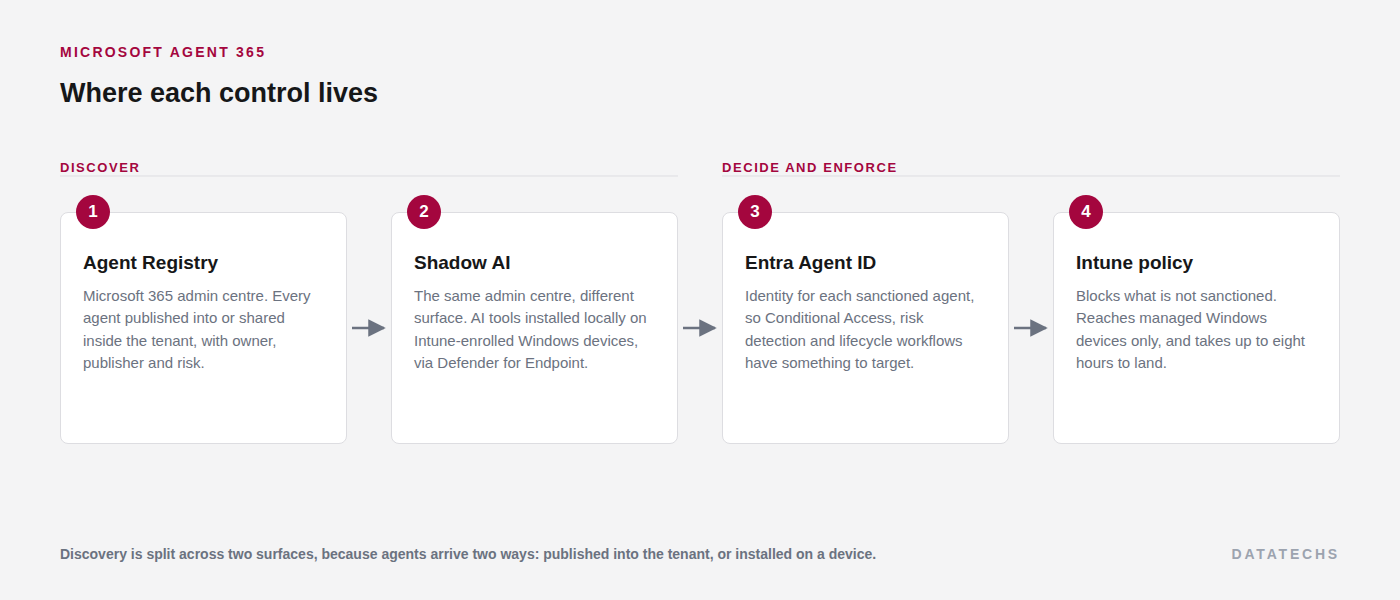
Agent 365 is the registry and the control plane. Entra remains the identity foundation underneath it, which is why ownership and inventory live in the admin centre while Conditional Access and risk detection stay in Entra. Microsoft has been converging the older, scattered registry views into Agent 365, so if you built anything against the Entra registry experience, that is the direction of travel.
Step 1: Establish the cross-tenant view
Start in the governing tenant rather than tenant by tenant, because the consolidated view is what makes this repeatable.
Where to find itadmin.microsoft.com › All tenants › Agents
What appears here depends on your active relationships, your delegated role in each tenant, and that tenant's licensing. A customer with no Agent 365 licence still lists, but risk and activity information will not populate.
| Delegated role | View inventory | Add, install or block |
|---|---|---|
| AI Administrator | Yes | Yes |
| Global Administrator | Yes | Yes |
| Global Reader | Yes | No |
Add AI Administrator to the GDAP role template you request on new relationships. Retrofitting it across an existing customer base is slow, and it is the one role that makes this whole area workable without falling back to Global Administrator.
Actions apply separately to each selected tenant, so a block issued across twelve customers is twelve operations that can each succeed or fail on their own. The tenant switcher next to the tenant name moves you into a single customer's context without signing out, and All tenants brings you back.
Step 2: Inventory what is already in each tenant
Where to find itadmin.microsoft.com › Agents › All agents › Registry
The registry summarises a tenant in three numbers. Record all three per tenant at onboarding, because they are the baseline everything later is measured against.
| Metric | What it counts | Why it matters |
|---|---|---|
| Total agents | Every agent available in the tenant, from Microsoft, external partners, the organisation itself, or an individual creator. | The denominator. Growth between reviews is the signal, not the absolute number. |
| Agents without owners | Agents with no valid owner, commonly because the creator's account was deleted. | Nobody is accountable for what it can reach, and leaver processes rarely account for agents. |
| Unmanaged agents | Agents created outside Agent 365, so without its risk protections applied. | The work queue. These are the ones to bring into the registry or retire. |
Filter by status, publisher type, channel, platform, data source and risk to narrow a long list. Export produces a CSV with more than thirty data points per agent, including publisher, version, owner, platform and risk, for either all agents or the current filtered set. That export is what you send a customer. The portal view is for working in.
Step 3: Pull the same inventory with Graph
Clicking through the registry once per customer does not scale past a handful of tenants. The same catalogue is available through Graph with the CopilotPackages.Read.All scope, which makes a fleet-wide comparison a scheduled job rather than an afternoon.
$Tenants = Get-Content .\tenants.txt   # one tenant id per line

foreach ($TenantId in $Tenants) {

    Connect-MgGraph -TenantId $TenantId -NoWelcome -Scopes 'CopilotPackages.Read.All'

    $uri  = 'https://graph.microsoft.com/v1.0/copilot/admin/catalog/packages'
    $rows = @()

    do {
        $page  = Invoke-MgGraphRequest -Method GET -Uri $uri
        $rows += $page.value
        $uri   = $page.'@odata.nextLink'
    } while ($uri)

    [pscustomobject]@{
        Tenant = $TenantId
        Agents = $rows.Count
    }
}
Programmatic access is currently in preview and requires the AI Administrator role. Run it read-only on a schedule, and treat a jump in the count between runs as the trigger for a look, rather than reviewing every agent every month.
On the identity side, Entra exposes agent objects through Graph beta as agentIdentity, agentUser, agentInstance and agentCollection, with agentRiskDetection and riskyAgent carrying risk signals. Beta, so fine for a reporting view and worth rechecking before anything depends on it.
Step 4: Find agents installed on endpoints
The registry covers agents published or shared into the tenant. It says nothing about an AI tool a developer installed on their own laptop. That is a separate surface with separate prerequisites.
Where to read the resultsadmin.microsoft.com › Agents › Shadow AI
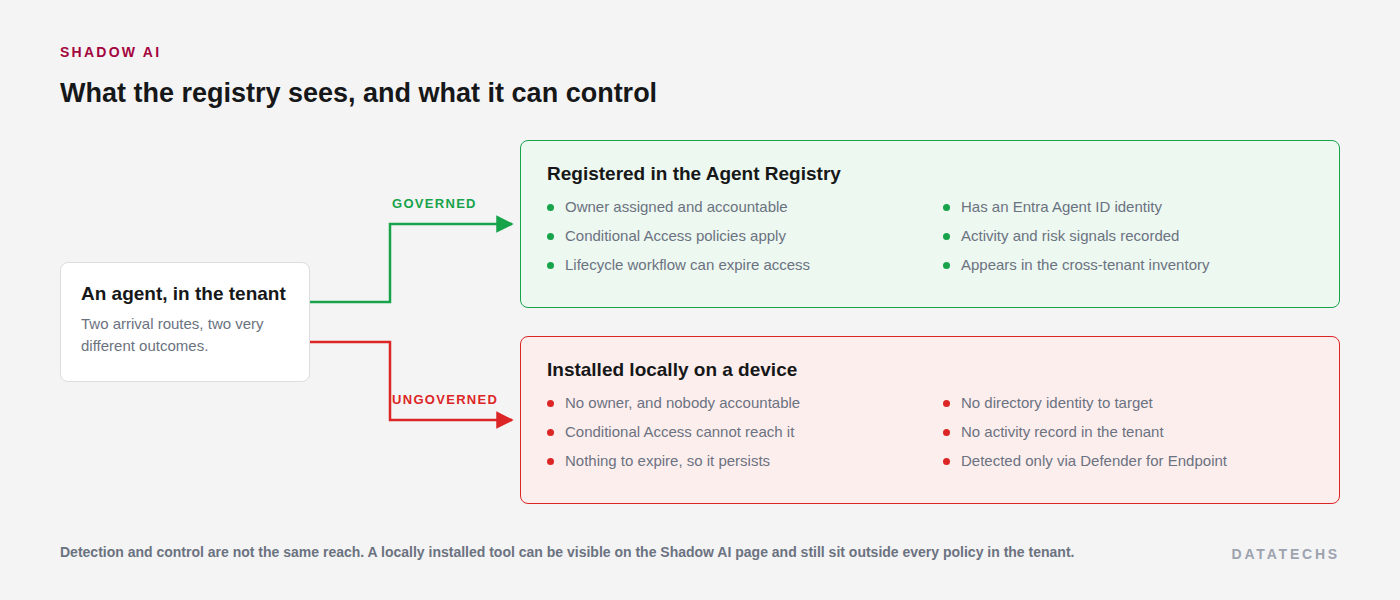
During the preview, detection and blocking cover different sets. Detection is broad, blocking is not.
| Tool | Detection | Blocking |
|---|---|---|
| OpenClaw | Available | Available |
| ChatGPT Desktop, Claude Desktop, Ollama Desktop, Poe Desktop, OpenCode, Claw and ZeroClaw | Available | Not available |
Each entry carries the date it was first seen, the most recent activity, and device and user counts, with a device list underneath giving name, model, operating system and last detection time. If Global Secure Access is enabled, network traffic metadata is added, which is the difference between knowing a tool is installed and knowing it is used.
Detection depends on Defender for Endpoint, so a tenant with an incomplete Defender rollout reports a reassuring and entirely inaccurate zero. Confirm onboarding coverage before reporting a number to anyone.
Step 5: Decide what is sanctioned, then block the rest
Agree the sanctioned list with the customer in writing before blocking anything. The tools that turn up here are usually in the hands of developers doing real work, and a block applied without that conversation lands as an outage rather than a control.
With the list agreed, the block is applied from the same page the detection came from.
Where to apply itadmin.microsoft.com › Agents › Shadow AI › (select the agent) › Security policies › Block › Apply Policies
That generates an Intune policy in the tenant named after the target, for example A365 - Block OpenClaw, which you can then scope or narrow further in Intune like any other policy.
Two constraints to plan around. The block only reaches managed Windows devices enrolled in Intune, so anything unenrolled is unaffected. Deployment takes between fifteen minutes and eight hours, which means this is not an incident response tool and should not be presented as one.
Step 6: Put identity controls around what you keep
Blocking handles what should not be there. Everything remaining needs an identity, an owner and an expiry, which is the Entra Agent ID side of the work.
| Control | What to set | Reason |
|---|---|---|
| Ownership | Assign an owner to every ownerless agent from the registry. | Without one there is nobody to ask whether it is still needed, and no route to a decision. |
| Conditional Access | Policies targeting agent identities and the resources they reach. | An agent identity that no policy targets inherits none of the tenant's access rules. |
| Identity Protection | Enable risk detection for agents. | Surfaces unfamiliar resource access and high sign-in volume, which is what a misbehaving agent looks like. |
| Lifecycle workflows | Limit how long an agent's access lasts. | Agents built for one project otherwise keep their access indefinitely. |
| Network controls | Apply web content, threat intelligence and file filtering to Copilot Studio agents. | Brings agent traffic under the same inspection as user traffic. |
Entra blocks a long list of high-privilege application permissions for agent identities outright, including Directory.ReadWrite.All, Application.ReadWrite.All and Sites.ReadWrite.All. That is a floor, not a policy: it stops the worst grants, it does not decide what any particular agent should reach.
Step 7: Set the review cadence
Monthly is enough for most customers, and three numbers per tenant carry nearly all the signal: total agents, agents without owners, and unmanaged agents. Anything else is detail you go looking for once one of those three moves. Note that risk counts in the registry can lag the security portals by up to an hour, so give a mismatch an hour before investigating it.
Troubleshooting
| Symptom | Cause | Fix |
|---|---|---|
| A customer tenant is missing from the All tenants view. | No active GDAP relationship, or no supported delegated role in that tenant. | Check that the relationship is active and that the role assignment carries AI Administrator or Global Administrator. |
| A tenant lists but the actions are greyed out. | The delegated role is read-only, typically Global Reader. | Request AI Administrator on that relationship. Read-only tenants stay visible by design. |
| Risk and activity columns are empty for one tenant. | That tenant has no Agent 365 licence. | Inventory still works without it. Risk and activity do not. |
| Shadow AI reports no detections in a tenant with known AI tool use. | Defender for Endpoint onboarding is incomplete, or the tenant is not opted into the Frontier preview. | Confirm Defender onboarding coverage first, then the preview opt-in. |
| A block was applied but the tool still runs. | The device is not enrolled in Intune, or the policy has not reached it yet. | Check enrolment, then allow up to eight hours before treating it as a failure. |
| The Graph script returns an authorisation error. | The signed-in account lacks AI Administrator, or consent for CopilotPackages.Read.All was never granted in that tenant. |
Assign the role and grant consent per tenant. It is not inherited from the governing tenant. |
| Agent counts differ between the registry and Graph. | A filter is applied in the portal view, which does not change the total shown. | Clear filters and compare again before assuming a sync problem. |
Most of this is a one-off per tenant, and once the GDAP roles and the Graph job are in place the monthly work is reading three numbers and acting when one of them moves.