

The month at a glance
| Change | Status | What it needs from you |
|---|---|---|
| Exchange Web Services enforcement | Live from 1 October 2026 | An inventory per tenant, and an allow list where anything still depends on it. |
| Data Location setting in Org settings | Available to five geographies | Nothing for a UK tenant. An answer ready for when a customer asks. |
| Intune deployment plans | General availability | A chance to retire your hand-built pilot and production group pairs. |
| Minimum supported iOS and iPadOS raised to 18 | In effect | A version report across enrolled devices before someone reports a broken Company Portal. |
| Client-driven compliance evaluation for Windows | General availability | Nothing. Worth knowing when a compliance state changes faster than it used to. |
| AI agent runtime protection in Defender for Endpoint | General availability | A policy in audit mode on a pilot ring. |
1. Exchange Web Services enforcement has started
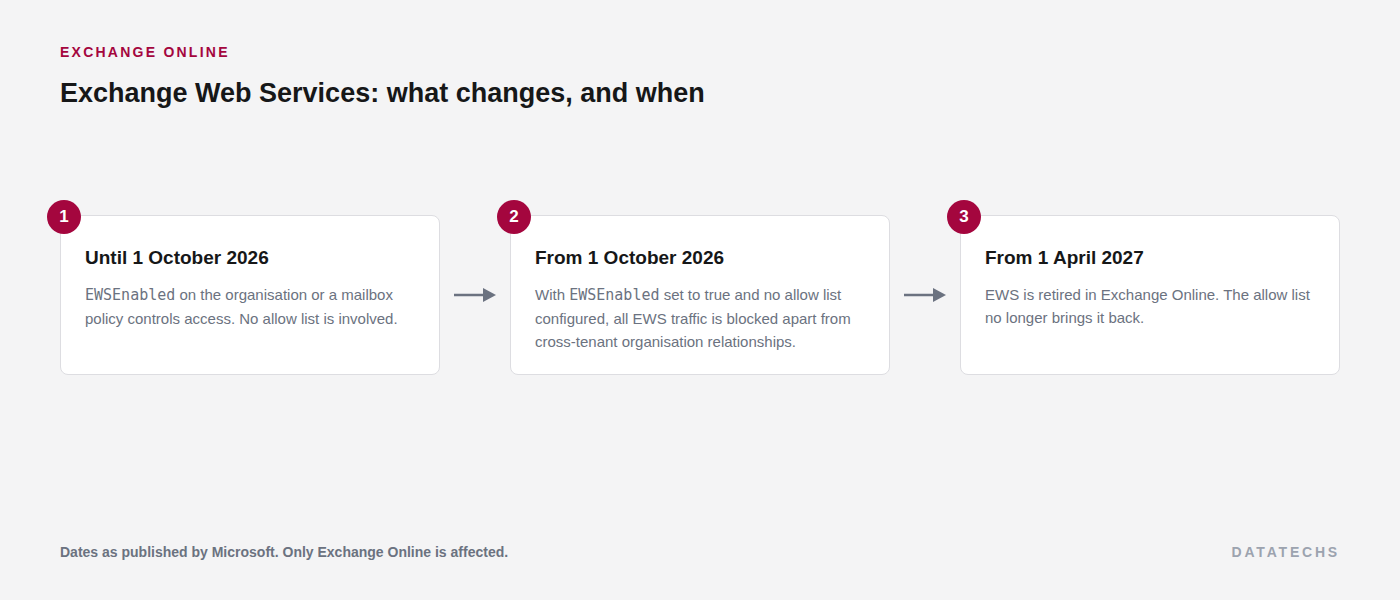
This is the item to deal with this week. Microsoft published the retirement in stages, and the stage that bites is the one that started on 1 October 2026: a tenant can still have EWSEnabled set to true, but without an allow list naming the applications permitted to use EWS, the traffic is blocked. Full retirement follows on 1 April 2027, after which the allow list no longer brings it back.
Read the current allow list per tenant. The retrieval switch is required, and a change can take up to 24 hours to apply:
Get-OrganizationConfig -RetrieveEwsOperationAccessPolicy |
    Format-List EwsAllowedAppIDs, EwsEnabled
Finding what still uses EWS is the harder half. Two approaches between them cover most of it. The first is the Entra sign-in logs, filtered to the Office 365 Exchange Online resource, then read down the application column.
Where to read the resultsentra.microsoft.com › Monitoring & health › Sign-in logs
The second is to look at what has been granted. Any application holding the full_access_as_app role or the EWS.AccessAsUser.All delegated scope on the Exchange Online service principal is a candidate, whether or not it has been used recently:
Connect-MgGraph -TenantId '<tenant-id>' -NoWelcome `
    -Scopes 'Application.Read.All','Directory.Read.All'

$Exo = Get-MgServicePrincipal -Filter "displayName eq 'Office 365 Exchange Online'"

Get-MgOauth2PermissionGrant -All |
    Where-Object { $_.ResourceId -eq $Exo.Id -and $_.Scope -match 'EWS' } |
    Select-Object ClientId, ConsentType, Scope

Get-MgServicePrincipalAppRoleAssignedTo -ServicePrincipalId $Exo.Id |
    Select-Object PrincipalDisplayName, PrincipalId
Backup products, signature management tools, migration utilities and older line of business integrations are where this usually turns up. Where the vendor has a Graph-based version, moving to it is the durable answer. The allow list only buys time until April.
2. The Data Location setting, and why UK tenants will not see it
A new Data Location card appeared in the Microsoft 365 admin centre during September, carrying a Product Terms Data Residency Setting that lets a tenant hold core service data in-country rather than regionally within the EU Data Boundary. It covers Exchange Online, SharePoint, OneDrive, Teams and Microsoft 365 Copilot.
Where to find itadmin.microsoft.com › Settings › Org settings › Organization profile › Data location
The setting itself is available only to commercial tenants with a default geography of France, Germany, Norway, Sweden or Switzerland. It is also hidden for tenants with Advanced Data Residency or Multi-Geo. A tenant with a United Kingdom default geography does not get the setting, so there is nothing to configure and nothing at risk from leaving it alone.
It is on this list because the coverage has not always made the eligibility clear, and a customer who has read a summary may well ask whether their data is about to move. The card itself still shows current and committed geography for any tenant, which is worth a screenshot during a compliance conversation.
3. Intune deployment plans reached general availability
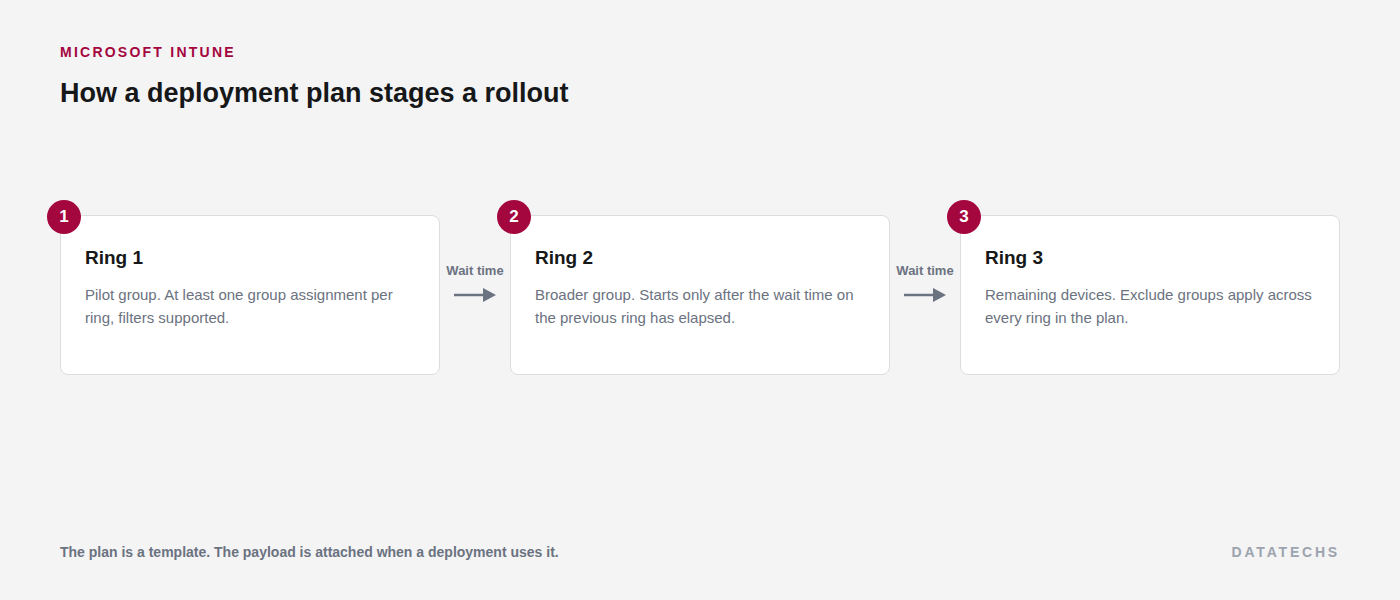
Staged rollout is now a first-class object in Intune rather than something you build out of group pairs and a calendar reminder. A deployment plan defines rings, each with its own group assignment and a wait time before the next ring starts, with a minimum of one hour. Exclude groups apply across every ring. The plan is a reusable template: the payload is attached when a deployment is created from it.
Where to find itintune.microsoft.com › Devices › Manage devices › Deployments › Create plan
Supported payloads at general availability are Win32 and Enterprise App Catalog apps, Settings Catalog policies and endpoint security policies. For anyone running the same baseline across several tenants, this is the piece that was previously a naming convention held together by discipline.
4. The minimum supported iOS and iPadOS version is now 18
Intune now requires iOS or iPadOS 18 or later for device management, the Company Portal and app protection policies. Devices on earlier versions are not blocked from existing, but they stop being supported, which in practice means an unexplained enrolment or Company Portal failure at the least convenient moment.
Run a version report across enrolled Apple devices in each tenant and flag anything below 18 now. In most estates this is a short list of older hardware that quietly stopped taking updates.
5. Client-driven compliance evaluation for Windows
Windows devices can now re-evaluate their own compliance state when something changes, rather than waiting for the next scheduled check-in. The settings covered are firewall, antivirus, BitLocker, Defender status, OS build, real-time protection and Secure Boot.
The practical effect is on Conditional Access. A device that falls out of compliance is marked as such sooner, and one that has just been remediated regains access sooner. Nothing to configure, but it explains a compliance state that moves faster than it used to.
6. AI agent runtime protection in Defender for Endpoint
An endpoint security template for Windows now carries AI agent runtime protection settings, with an audit mode and a block mode. It sits on the device side of the picture, alongside the tenant-side agent governance covered in the Agent 365 post last week.
Start in audit on a pilot ring. Agent behaviour on a developer workstation looks very different from agent behaviour on a finance laptop, and audit data from the actual estate is a better basis for a block policy than an assumption about which is which.
Troubleshooting notes
| Symptom | Cause | Fix |
|---|---|---|
| A vendor integration stopped collecting mail or calendar data in early October. | It uses EWS and the tenant has no allow list. | Identify the application id, add it to the allow list, and allow up to 24 hours. Then ask the vendor for the Graph-based version. |
| The allow list looks empty when you query it. | The retrieval switch was omitted. | Include -RetrieveEwsOperationAccessPolicy on Get-OrganizationConfig. |
| The Data location card is missing from Org settings. | The tenant default geography is outside the five eligible countries, or the tenant has Advanced Data Residency or Multi-Geo. | Expected behaviour for a UK tenant. Nothing to change. |
| A deployment ring never advances. | A ring has no group assignment, or a Multi Admin Approval request is still outstanding. | Assign at least one group to every ring, and check the pending approvals queue. |
Of the six, only the Exchange Web Services deadline needs anything done this week. The rest are worth a line in your tenant onboarding notes so they are already handled the next time you stand one up.